
博客内容Blog Content
Langchain相关组件的使用 Use of Langchain-related components
介绍Langchain的安装和核心组件Prompt,Model,OutputParser的使用以及LCEL表达式和回调概念 Introduction to the installation of Langchain and the usage of core components Prompt, Model, OutputParser, as well as the concept of LCEL expressions and callbacks
Langchain安装 Langchain installation
通过以下命令安装 LangChain 版本的最低依赖要求,并安装基础的 LangChain 社区包。
Use the following command to install the minimum dependency requirements for the LangChain version and install the base LangChain community package.
pip install langchain langchain-community
执行安装 langchain 后会自动安装以下扩展包:
After installing langchain, the following extension packages will be automatically installed:
langsmith, langchain-core, langchain-text-splitters, langchain, langchain-community
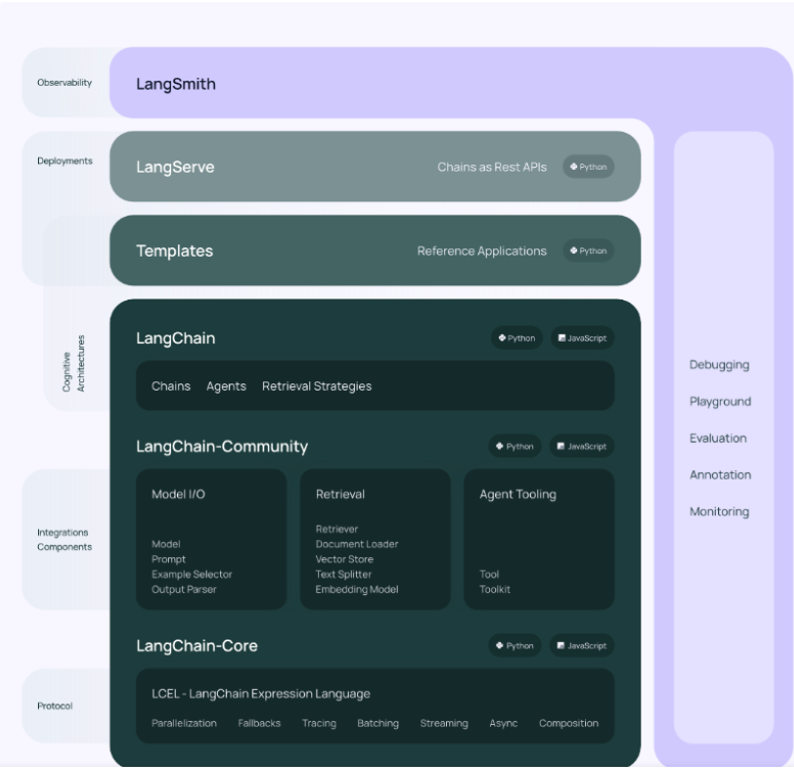
LangChain 框架本身由多个开源库组成(v0.2.1版本):
langchain-core:基础抽象和 LangChain 表达式语言LCEL。
langchain-community:第三方集成以及合作伙伴包(如 langchain-openai、langchain-anthropic 等),一些集成已经进一步拆分为自己的轻量级包,只依赖于 langchain-core。
langchain:构建应用程序认知架构的链、代理和检索策略。
langgraph:通过将步骤构建为图中的边和节点,使用 LLMs 构建健壮且有状态的多参与者应用程序。
langserve:将 LangChain 链部署为 REST API。
langsmith:一个开发平台,可以让你调试、测试、评估和监控 LLM 应用程序,并与 LangChain 无缝衔接
The LangChain framework itself consists of multiple open-source libraries (version v0.2.1):
langchain-core: Basic abstractions and LangChain Expression Language LCEL.
langchain-community: Third-party integrations and partner packages (such as langchain-openai, langchain-anthropic, etc.). Some integrations have been further split into their own lightweight packages, depending only on langchain-core.
langchain: Chains, agents, and retrieval strategies to build application cognitive architectures.
langgraph: Builds robust and stateful multi-agent applications using LLMs by constructing steps as edges and nodes in a graph.
langserve: Deploys LangChain chains as REST APIs.
langsmith: A development platform that allows you to debug, test, evaluate, and monitor LLM applications, seamlessly integrated with LangChain.
Prompt
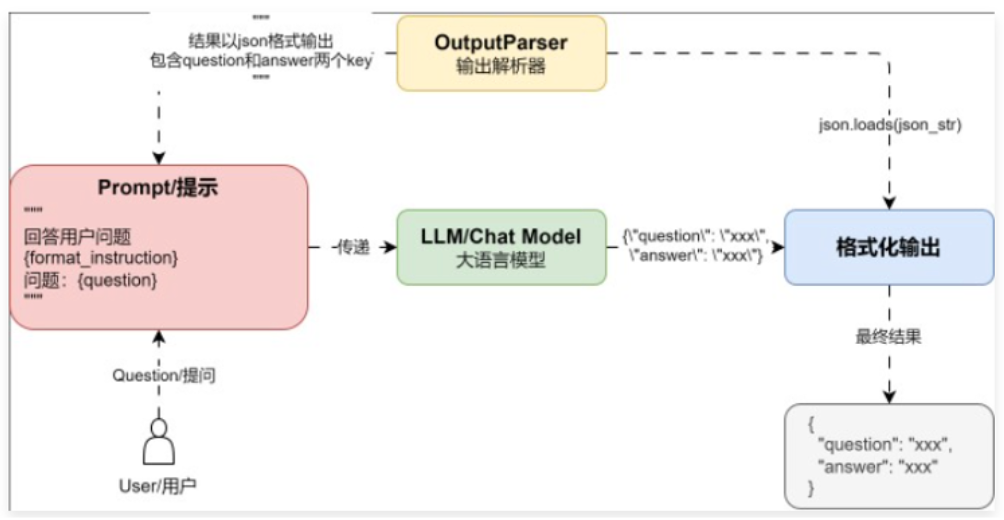
大多数 LLM 应用程序都不会直接将用户输入传递给 LLM。通常,它们会将用户输入添加到一个更大的文本片段中,称为提示模板,该模板提供有关特定任务的附加上下文。并且 Prompt 是所有 AI 应用交互的起点,以下是 LangChain 中一个最基础的聊天应用机器人的运行流程如下
Most LLM applications do not pass user input directly to the LLM. Usually, they add the user input into a larger text chunk called a prompt template, which provides additional context about the specific task. And Prompt is the starting point for all AI application interactions. The basic flow of a chatbot application in LangChain is as follows.
为了适配不同的 LLM,LangChain 封装了 Prompt 组件,并且 Prompt 组件是高可移植性的,同一个 Prompt 可以支持各种 LLM,在切换 LLM 的时候,无需修改 Prompt。对于 Prompt Template,在 LangChain 中,又涵盖了多个子组件,例如:角色提示模板、消息占位符、文本提示模板、聊天消息提示模板、提示、消息等,Prompt Template 的运行流程如下:
To adapt to different LLMs, LangChain encapsulates the Prompt component, which is highly portable. The same Prompt can support various LLMs, and switching LLMs does not require modifying the Prompt. Regarding Prompt Template, LangChain includes several subcomponents such as: role prompt templates, message placeholders, text prompt templates, chat message prompt templates, prompts, messages, etc. The flow of a Prompt Template is as follows:
PromptTemplate/ChatPromptTemplate -> PromptValue -> str/message
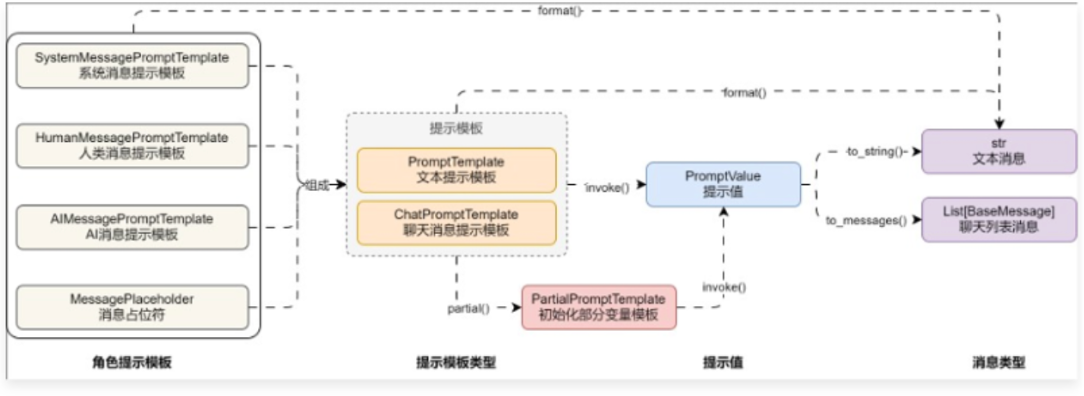
不同 Prompt 组件功能的简介:
•PromptTemplate:用于创建文本消息提示模板,用于用于与大语言模型/文本生成模型进行交互。
•ChatPromptTemplate:用于创建聊天消息提示模板,一般用于与聊天模型进行交互。
•MessagePlaceholder:消息占位符,在聊天模型中对不确定是否需要的消息进行占位。
•SystemMessagePromptTemplate:用于创建系统消息提示模板,角色为系统。
•HumanMessagePromptTemplate:用于创建人类消息提示模板,角色为人类。
•AIMessagePromptTemplate:用于创建AI消息提示模板,角色为AI。
•PipelinePromptTemplate:用于创建管道消息,管道消息可以将提示模板作为变量进行快速复用。
Brief introduction of different Prompt component functions:
•PromptTemplate: Used to create text message prompt templates for interacting with large language models/text generation models.
•ChatPromptTemplate: Used to create chat message prompt templates, generally for interacting with chat models.
•MessagePlaceholder: Message placeholder, used to hold places for optional messages in chat models.
•SystemMessagePromptTemplate: Used to create system message prompt templates, with the role of system.
•HumanMessagePromptTemplate: Used to create human message prompt templates, with the role of human.
•AIMessagePromptTemplate: Used to create AI message prompt templates, with the role of AI.
•PipelinePromptTemplate: Used to create pipeline prompts, allowing prompt templates to be reused as variables efficiently.
Prompt 中重载的运算符:+运算符:在 Prompt 组件中,对 + 运算符使用 __add__ 方法进行重写,所以几乎所有 Prompt 组件都可以使用 + 进行组装拼接。
Overloaded operator in Prompt: operator: In Prompt components, the + operator is overridden using the add method, so almost all Prompt components can be assembled using the + operator.
Model
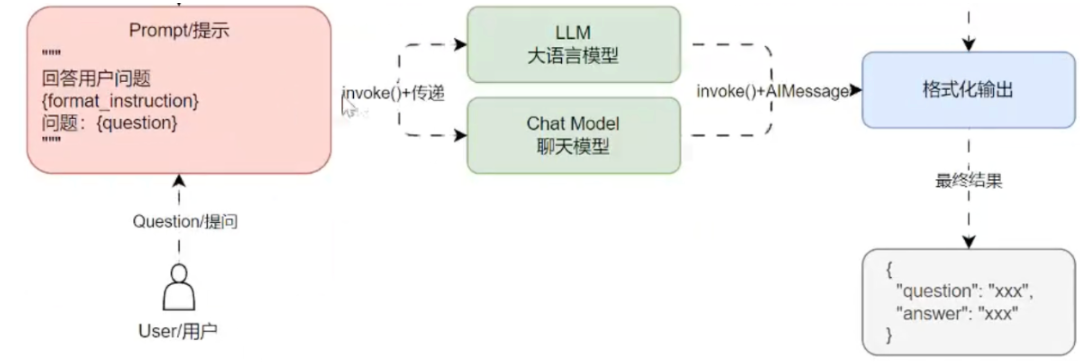
Model 是 LangChain 的核心组件,但是 LangChain 本身不提供自己的 LLM,而是提供了一个标准接口,用于封装不同类型的 LLM 进行交互,其中 LangChain 为两种类型的模型提供接口和集成:
LLM:使用纯文本作为输入和输出的大语言模型。
Chat Model:使用聊天消息列表作为输入并返回聊天消息的聊天模型。
在 LangChain 中,无论是 LLM 亦或者 Chat Model 都可以接受 PromptValue/字符串/消息列表 作为参数,内部会根据模型的类型自动转换成字符串亦或者消息列表,屏蔽了不同模型的差异。
Model is a core component of LangChain, but LangChain itself does not provide its own LLM. Instead, it offers a standard interface for wrapping different types of LLMs to interact with them. LangChain provides interfaces and integrations for two types of models:
LLM: Large Language Models using plain text as input and output.
Chat Model: Chat models that take a list of chat messages as input and return chat messages.
In LangChain, whether it’s LLM or Chat Model, they can accept PromptValue/string/message list as parameters. Internally, it automatically converts to a string or message list based on the model type, shielding differences between models.
调用大模型最常用的方法为:
invoke:传递对应的文本提示/消息提示,大语言模型生成对应的内容。
batch:invoke 的批量版本,可以一次性生成多个内容。
stream:invoke 的流式输出版本,大语言模型每生成一个字符就返回一个字符。
The most common methods for calling large models:
invoke: Pass the corresponding text prompt/message prompt, and the large language model generates corresponding content.
batch: Batch version of invoke, can generate multiple outputs at once.
stream: Stream version of invoke, returns one character at a time as the LLM generates.
基础聊天应用的运行流程如下:
The basic chatbot application flow is as follows:
OutputParser
我们在使用大语言模型的时候,无论是使用 LangChain,还是直接使用模型的 API,都会遇到大语言模型的输出解析问题,有时返回的内容都是一个字符串,并不是结构化的数据,某些场合下我们需要的仅仅是对应的返回值,而不是多余的内容,就需要对返回的内容进行结构化、格式化或者解析。
When using large language models, whether using LangChain or directly using the model's API, we often encounter the issue of parsing the output. Sometimes the returned content is just a string, not structured data. In some scenarios, we only need the corresponding return value, not extra information, so we need to structure, format, or parse the returned content.
因此,如果需要 LLM 理解你想要的格式,需要向 LLM 告知要输出的结构信息,当 LLM 进行推理并输出之后,我们需要按照和 LLM 约定的格式进行解析,于是就诞生了 输出解析器 的概念。
简单拆解: 输出解析器 = 1.预设提示 + 2.解析功能
输出解析器的解析场景:
将非结构化的文本转换为结构化的数据:将文本解析为一个 json 或者是 Python 里的字典等。
截取部分文本:只要结果中的某一部分即可。
自定义处理:在提示中注入其他的指令,告诉语言模型如何去给我返回一个格式的答案,然后解析器可以根据返回提示文本对应的内容做对应的解析。
Therefore, if you want the LLM to understand the format you need, you must inform the LLM of the structure to output. After the LLM reasons and outputs, we need to parse it according to the agreed format. Thus, the concept of OutputParser was born.
Simple breakdown: OutputParser = 1. Preset prompt + 2. Parsing function
OutputParser use cases:
Convert unstructured text into structured data: Parse text into JSON or Python dictionary, etc.
Extract part of the text: Only extract a certain part of the result.
Custom processing: Inject other instructions in the prompt to tell the LLM how to return a formatted answer, then the parser parses it accordingly.
当然除了parser也有其它思路:让llm调用一个function或tool,这个function或tool里面指定参数让llm传入,里面具体逻辑是自定义的格式化,这样数据更加准确(是固定逻辑代码)
Of course, besides parser, there are other approaches: let the LLM call a function or tool, specifying parameters inside to be passed in by the LLM. The internal logic is custom formatting, making the data more accurate (fixed logic code).
在 LangChain 中预设了大量的输出解析器,输出解析器通常包含两个抽象函数的实现,这也是自定义输出解析器需要实现的两个函数:
get_format_instructions:用来约定输出的格式,并转换为描述文本。
parse:用来解析 LLM 的输出为约定的格式。
调用链路:调用get_format_instructions生成格式说明 -> 加入prompt -> llm回答 -> 调用parse根据格式说明解析llm回答 -> 得到格式json -> 进一步解析成格式类
LangChain includes many built-in output parsers. Output parsers usually implement two abstract functions, which are also required for custom output parsers:
get_format_instructions: Used to define the output format and convert it into descriptive text.
parse: Used to parse the LLM output into the agreed format.
Call chain: call get_format_instructions to generate format instructions -> add to prompt -> LLM answers -> call parse to parse LLM answer based on format instructions -> get formatted JSON -> further parse into structured class.
# 1. 创建Pydantic模型,定义结构化输出
class Joke(BaseModel):
joke: str = Field(description="一个笑话的内容")
punchline: str = Field(description="这个笑话的笑点")
# 2. 创建JsonOutputParser,指明Pydantic模型
parser = JsonOutputParser(pydantic_object=Joke)
print("# [格式化说明(给大模型看)]")
print(parser.get_format_instructions())
print("=" * 50)
# 3. 构建提示模板,插入格式化说明和用户问题
chat_prompt = ChatPromptTemplate.from_template(
"你是一个友好的助手。现在的时间是 {now}。\n"
"请根据用户的问题进行回答,务必按下述格式输出:\n"
"{format_instruction}\n"
"问题:{question}\n"
).partial(
now="2025年1月1日",
format_instruction=parser.get_format_instructions(),
)
prompt_invoke = chat_prompt.invoke({"question": "请告诉我一个笑话。"})
print("# [最终提示内容(给大模型看)]")
print(prompt_invoke.to_string())
print("=" * 50)
# 4. 调用LLM并解析结构化回答
dotenv.load_dotenv() # 加载.env中API_KEY
llm = ChatOpenAI() # 默认读取OPENAI_API_KEY环境变量
llm_response = llm.invoke(prompt_invoke)
print("# [原始LLM响应]")
print(llm_response)
print("=" * 50)
# 5. 解析为Pydantic对象
parser_invoke = parser.invoke(llm_response)
print("# [解析为Joke对象]")
print(parser_invoke)
print(type(parser_invoke))
print("=" * 50)
# 6. 如果你拿到的是dict,也可以手动转成Joke对象
# 用Joke模型解析dict
joke_obj = Joke.parse_obj(parser_invoke)
print("# [手动转换为Joke对象]")
print(joke_obj)
print(type(joke_obj))
print("=" * 50)
# 7. 可以访问字段
print(f"笑话内容:{joke_obj.joke}\n笑点:{joke_obj.punchline}")
LCEL表达式和Runnable
我们使用多个组件的 invoke 进行嵌套来创建 LLM 应用,示例代码如下
We use nested invoke calls of multiple components to create LLM applications. Example code as follows:
prompt = ChatPromptTemplate.from_template()
llm = ChatOpenAI(=)
parser = StrOutputParser()

content = parser.invoke(
    llm.invoke(
        prompt.invoke(
            {: req.query.data}
        )
    )
)
这种写法虽然能实现对应的功能,但是存在很多缺陷:
嵌套式写法让程序的维护性与可阅读性大大降低,当需要修改某个组件时,变得异常困难。
没法得知每一步的具体结果与执行进度,出错时难以排查。
嵌套式写法没法集成大量的组件,组件越来越多时,代码会变成“一次性”代码。
Although this style works, it has many drawbacks:
The nested code significantly reduces maintainability and readability, making it difficult to modify individual components.
It’s hard to know the result and progress at each step, making error tracing difficult.
Nested code cannot integrate many components. As components increase, the code becomes one-off and unmanageable.
观察发现,虽然 Prompt、Model、OutputParser 分别有自己独立的调用方式,例如:
Prompt 组件:format、invoke、to_string、to_messages。
Model 组件:generate、invoke、batch。
OutputParser 组件:parse、invoke。
但是有一个共同的调用方法:invoke,并且每一个组件的输出都是下一个组件的输入,是否可以将所有组件组装得到一个列表,然后循环依次调用 invoke 执行每一个组件,然后将当前组件的输出作为下一个组件的输入?
Observation: although Prompt, Model, and OutputParser each have their own call methods, such as:
Prompt components: format, invoke, to_string, to_messages
Model components: generate, invoke, batch
OutputParser components: parse, invoke
They all share a common method: invoke. And each component's output is the next component's input. So, can we assemble all components into a list, then loop through and call invoke one by one, passing the current output to the next input?
LCEL, or LangChain Expression Language, is a declarative syntax for composing complex workflows with large language models (LLMs). It simplifies building chains of components like prompt templates, models, and parsers by using a pipe operator (|) to pass the output of one step to the input of the next. LCEL offers performance benefits like parallel execution, streaming support, and built-in features for error handling, retries, and fallbacks.
为了尽可能简化创建自定义链,LangChain 官方实现了一个 Runnable 协议,这个协议适用于 LangChain 中的绝大部分组件,并实现了大量的标准接口,涵盖:
stream:将组件的响应块流式返回,如果组件不支持流式则会直接输出。
invoke:调用组件并得到对应的结果。
batch:批量调用组件并得到对应的结果。
astream:stream 的异步版本。
ainvoke:invoke 的异步版本。
abatch:batch 的异步版本。
astream_log:除了流式返回最终响应块之外,还会流式返回中间步骤。
除此之外,在 Runnable 中还重写了 __or__ 和 __ror__ 方法,这是 Python 中 | 运算符的计算逻辑,所有的 Runnable 组件,均可以通过 | 或者 pipe() 的方式将多个组件拼接起来形成一条链
To simplify creating custom chains as much as possible, LangChain officially implemented a Runnable protocol. This protocol applies to most components in LangChain and implements many standard interfaces, including:
stream: streams the response chunks from the component. If streaming is not supported, it outputs directly.
invoke: calls the component and returns the corresponding result.
batch: batch calls the component and returns results.
astream: asynchronous version of stream.
ainvoke: asynchronous version of invoke.
abatch: asynchronous version of batch.
astream_log: streams not only the final response chunks but also intermediate steps.
In addition, in Runnable, the or and ror methods are overridden, which are the logic for the | operator in Python. All Runnable components can be chained together using | or pipe().
使用示例 Example usage
import dotenv
from langchain_core.output_parsers import StrOutputParser
from langchain_core.prompts import ChatPromptTemplate
from langchain_openai import ChatOpenAI
dotenv.load_dotenv()
prompt = ChatPromptTemplate.from_template("{question}")
parser = StrOutputParser()
llm = ChatOpenAI()
# 创建chain
chain = prompt | llm | parser
print(chain.invoke({"question": "你是谁?"}))
回调功能调试链 Callback function to debug chains
Callback 是 LangChain 提供的回调机制,允许我们在 LLM 应用程序的各个阶段使用 hook(钩子)。钩子的含义也非常简单,我们把应用程序看成一个一个的处理逻辑,从开始到结束,钩子就是在事件传送到终点前截获并监控事件的传输。
Callback is a callback mechanism provided by LangChain, allowing us to use hooks at various stages of the LLM application. The meaning of a hook is simple: we treat the application as a series of processing logic from start to finish. A hook intercepts and monitors events before they reach the endpoint.
Callback 对于记录日志、监控、流式传输等任务非常有用,简单理解,Callback 就是记录整个流程的运行情况的一个组件,在每个关键的节点记录响应的信息以便跟踪整个应用的运行情况。
例如:
1.在 Agent 模块中调用了几次 tool,每次的返回值是什么?
2.在 LLM 模块的执行输出是什么样的,是否有报错?
3.在 OutputParser 模块的输出解析是什么样的,重试了几次?
Callback 收集到的信息可以直接输出到控制台,也可以输出到文件,更可以输入到第三方应用,相当于独立的日志管理系统,通过这些日志就可以分析应用的运行情况,统计异常率,运行的瓶颈模块以便优化。
Callback is veryuseful for logging, monitoring, streaming, etc. Simply put, Callback is a component that records the running status of the entire process. It logs responses at each key node to track the application’s runtime state.
For example:
How many times was a tool called in the Agent module? What were the return values each time?
What was the output of the LLM module? Were there any errors?
What was the output parsing in the OutputParser module? How many retries were there?
The information collected by Callback can be output directly to the console, to a file, or to third-party applications. It’s essentially an independent log management system. These logs can be used to analyze how the application runs, calculate error rates, identify bottleneck modules, and optimize them.
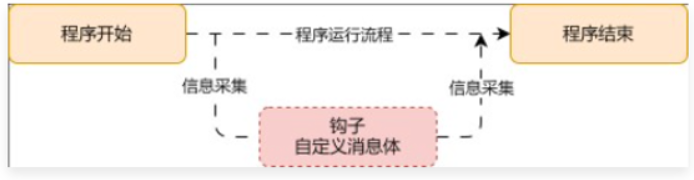
在 LangChain 中使用回调,使用 CallbackHandler 几种方式:
在运行 invoke 时传递对应的 config 信息配置 callbacks(推荐)。
在 Chain 上调用 with_config 函数,传递对应的 config 并配置 callbacks(推荐)。
在构建大语言模型时,传递 callbacks 参数(不推荐)。
在 LangChain 中提供了两个最基础的 CallbackHandler,分别是:StdOutCallbackHandler 和 FileCallbackHandler。
In LangChain, to use callbacks, use CallbackHandler in several ways:
Pass the corresponding config info with callbacks when running invoke (recommended).
Call with_config on the Chain and pass the config with callbacks (recommended).
Pass the callbacks parameter when constructing the LLM (not recommended).
LangChain provides two most basic CallbackHandlers: StdOutCallbackHandler and FileCallbackHandler.
定义handlers示例,实现需要hook的回调函数
Define handler example and implement the required hook callback functions.
dotenv.load_dotenv()
prompt = ChatPromptTemplate.from_template("""{question}""")
parser = StrOutputParser()
llm = ChatOpenAI()
# 在handler里实现自定义的回调函数
class MyCallbackHandler(BaseCallbackHandler):
start_at : float = 0
end_at : float = 0
def on_chat_model_start(
self,
serialized: Dict[str, Any], # 模型的配置信息
messages: List[List[BaseMessage]], # 输入给模型的消息
*, # 关键字参数
run_id: UUID, # 当前运行的唯一标识符
parent_run_id: Optional[UUID] = None, # 父运行的唯一标识符
tags: Optional[List[str]] = None, # 运行的标签
metadata: Optional[Dict[str, Any]] = None, # 运行的元数据
**kwargs: Any, # 其他可选参数
) -> Any:
print("自定义回调函数on_chat_model_start:聊天模型开始运行")
print(f"模型配置: {serialized}")
print(f"输入消息: {messages}")
self.start_at = time.time()
def on_llm_start(
self,
serialized: Dict[str, Any],
prompts: List[str],
*,
run_id: UUID,
parent_run_id: Optional[UUID] = None,
tags: Optional[List[str]] = None,
metadata: Optional[Dict[str, Any]] = None,
**kwargs: Any,
) -> Any:
print("自定义回调函数on_llm_start:聊天模型开始运行")
print(f"模型配置: {serialized}")
print(f"输入消息: {prompts}")
self.start_at = time.time()
def on_llm_end(
self,
response: LLMResult,
*,
run_id: UUID,
parent_run_id: Optional[UUID] = None,
**kwargs: Any,
) -> Any:
self.end_at = time.time()
duration = self.end_at - self.start_at
print(f"自定义回调函数on_llm_end:聊天模型运行结束,耗时 {duration:.2f} 秒")
def on_llm_new_token(
self,
token: str,
*,
chunk: Optional[Union[GenerationChunk, ChatGenerationChunk]] = None,
run_id: UUID,
parent_run_id: Optional[UUID] = None,
**kwargs: Any,
) -> Any:
print(f"自定义回调函数on_llm_new_token:生成新token: {token}")
# 创建chain
chain = {"question" : RunnablePassthrough()} | prompt | llm | parser
# 调用chain,传入自定义的回调函数
res = chain.stream(
{"question" : "你是谁?"},
config={"callbacks" : [MyCallbackHandler()],}
)
for chunk in res:
print(f"输出: {chunk}")
print("-" * 50)